Showing posts with label Autel IM608. Show all posts

Monday, May 16, 2022

How to Program 2005 Honda Civic ECM by Autel MaxiIM IM608

How-to-Program-2005-Honda-Civic-ECM-by-Autel-MaxiIM-IM608-7

2005 Honda Civic that has been replacing an refurbished engine computer(ECM). The immobilizer light is on because its module is not programmed to the car with VIN number or security system.  Here is the tutorials to use the Autel MaxiIM IM608 to solve it.

How-to-Program-2005-Honda-Civic-ECM-by-Autel-MaxiIM-IM608-2

Let’s get this car cranked, with not start.

And connect to Autel IM608, click

Diagnostics >> Honda >> Accept >> Automatic selection >> Read >> OK >> USA >> Yes >> Diagnosis >> Control unit >> IMMOBI

Keep ignition ON until the tester directs you to turn the ignition off.

The tester cannot program keys with a T5 stamped on the blade of the key or with the word ILCO on the plastic head. These keys can only be programmed with the ILCO key duplicator.

It’s 3rd immobilizer.

Immobilizer setup >> Special function >> Replace ECM/ PCM

This function does necessary registration for ECM/PCM replacement.

When the ECM/PCM is replaced, it is necessary to be recognized a code each other to the ECM/PCM and the immobilizer Control Unit-Receiver with the diagnostic tool. Also, the vehicle with Keyless Access System needs to be recognized a code each other to the ECM/PCM and Keyless Access Control Unit. Otherwise, the engine cannot be started.

After replacing the ECM/PCM and registering the keys, the new ECM/PCM must be checked for the latest program.

How-to-Program-2005-Honda-Civic-ECM-by-Autel-MaxiIM-IM608-3
How-to-Program-2005-Honda-Civic-ECM-by-Autel-MaxiIM-IM608-4
How-to-Program-2005-Honda-Civic-ECM-by-Autel-MaxiIM-IM608-5
How-to-Program-2005-Honda-Civic-ECM-by-Autel-MaxiIM-IM608-6

The registration of immobilizer codes into the immobilizer unit has been completed.

Turn the ignition switch off.

Check all keys to ensure each will start the engine.

Turn the ignition switch on.

Is this vehicle equipped with a Keyless Access system? No

Before selecting yes, remove the immobilizer key from the vehicle remote, place into the ignition, then turn on.

At this point, immobilizer light is already out.

Let’s try to see if the car starts, it starts normally.

Done.

How-to-Program-2005-Honda-Civic-ECM-by-Autel-MaxiIM-IM608-7

This is how to program an used engine computer for Honda replacement with Autel IM608.

Sunday, February 20, 2022

How to Autel IM608 to Program Porsche Cayenne 93C86 Key

How to program a new key for Porsche Cayenne Continental with Autel IM608? Year 2008 is 315MHz with panic button. Autel XP400 Pro says chip not connected.

How-to-Autel-IM608-to-Program-Porsche-Cayenne-93C86-Key-1
How-to-Autel-IM608-to-Program-Porsche-Cayenne-93C86-Key-2
How-to-Autel-IM608-to-Program-Porsche-Cayenne-93C86-Key-3
How-to-Autel-IM608-to-Program-Porsche-Cayenne-93C86-Key-4

Solution:
Obd or on the bench. 2 options here. Sometimes it’s easy via obd. If not, then in the bank. Gasoline is usually ok by OBD. Diesel on bench. Normally. You need with cs and pin. You just can’t proceed without a PIN and CS. Remove the kessy read the 93c86 and get PIN and 7 digits cs. Then program via obd. CS needs to precode the key and then program it with the PIN code.

Just did one today.
1. Remove chip and read using APA002.
2. Dealer key
3. Load EEprom data
4. Make dealer key
5. Learn key

How-to-Autel-IM608-to-Program-Porsche-Cayenne-93C86-Key-5

Wednesday, February 16, 2022

How to Add Key on Renault Duster 2017 by Autel IM608

Renault Duster 2017 is created by Autel MaxiIM IM608 in 3 minutes. easy money. IM608 can present Duster 2013. Add keys & all lost keys is the same, you have to program old and new from the beginning.

Go to Add key (guided)
Network is required during the process.
Step 1: Read Dflash data and save

How-to-Add-Key-on-Renault-Duster-2017-by-Autel-IM608-1
How-to-Add-Key-on-Renault-Duster-2017-by-Autel-IM608-2
How-to-Add-Key-on-Renault-Duster-2017-by-Autel-IM608-3

Step 2:Read PIN

How-to-Add-Key-on-Renault-Duster-2017-by-Autel-IM608-4

Step 3: Key learning

Insert key into ignition switch

Program successful

Remove and insert next key to be programmed

Program 2nd key success

How-to-Add-Key-on-Renault-Duster-2017-by-Autel-IM608-5
How-to-Add-Key-on-Renault-Duster-2017-by-Autel-IM608-6
How-to-Add-Key-on-Renault-Duster-2017-by-Autel-IM608-7
How-to-Add-Key-on-Renault-Duster-2017-by-Autel-IM608-8

Key learning completed.

How-to-Add-Key-on-Renault-Duster-2017-by-Autel-IM608-9
How-to-Add-Key-on-Renault-Duster-2017-by-Autel-IM608-10


Sunday, February 6, 2022

Hyundai Santa FE 2010 AKL Programming by Autel IM608 Success


This is a successful demonstration on how to add two new keys for Hyundai Santa FE 2010 by Autel IM608 when all keys lost.

Let’s start it from the key decoding.

Tools:
LISHI Decoder
Autel MaxiIM IM608
Xhorse Dolphin XP-005 key cutting machine
MINI Key Tool
XSKF01EN smart key

Step 1. Make key blades
Get door key bitting by LISHI Decoder.
Use Xhorse Dolphin XP-005 key cutting machine to make two blades.

Hyundai-Santa-FE-2010-AKL-Programming-by-Autel-IM608-Success-1
Hyundai-Santa-FE-2010-AKL-Programming-by-Autel-IM608-Success-2

The keys can only open the car’s door.

Step 2. Generate transponder
So now we’re going to generate remote by VVDI MINI Key Tool.

Press
Vehicle Remote>>Hyundai>>Santa Fe>>Elantra KeylessGo ID46 433
Insert the Xhorse XSKF01EN smart key into the coil and press “Generate”.

Hyundai-Santa-FE-2010-AKL-Programming-by-Autel-IM608-Success-3

Step 3. Read PIN code
Now into the car.
Open the Autel IM608.

Press
IMMO>>Hyundai>>Manual selection>>Europe>>SANTAFE (CM)>>2010-2013>>Smart Key
Confirm the vehicle information and enter the main menu.
If anything puzzles, here select “Vehicle immo information” to check the key information and OBD position.

Then press “Immo status scan”, because we need to clear the DTCs first.
After scanning, select the fault one and select “Clear DTC” to clear the DTC as the prompts.

Hyundai-Santa-FE-2010-AKL-Programming-by-Autel-IM608-Success-4

On scanning interface, press
Read PIN>>Read Pin code(46 Smart card)>>Read Pincode by OBD
Here it will say that the function only supports vehicles with 46-chip smart card.
Follow the prompts.

Hyundai-Santa-FE-2010-AKL-Programming-by-Autel-IM608-Success-5
Hyundai-Santa-FE-2010-AKL-Programming-by-Autel-IM608-Success-6

Then we have the password.

Hyundai-Santa-FE-2010-AKL-Programming-by-Autel-IM608-Success-7

Step 4. All key lost programming
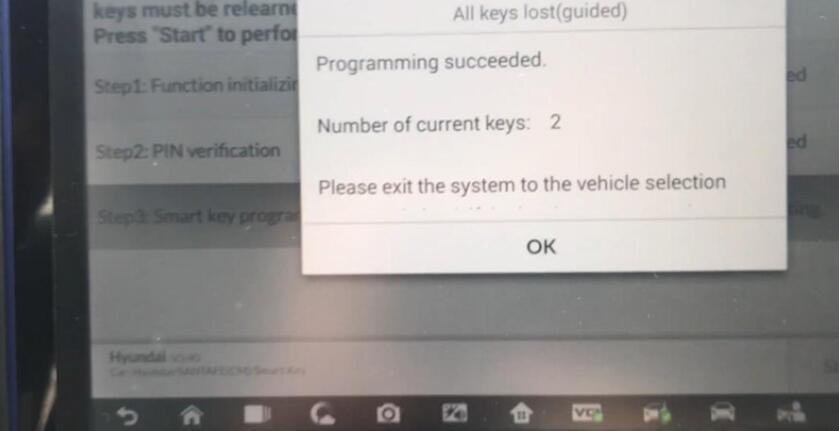
Back to scanning interface, press “All keys lost(guided)”.
For step 1, it will erase all existing keys.
Insert the smart key to be programmed into the card slot

Hyundai-Santa-FE-2010-AKL-Programming-by-Autel-IM608-Success-8

For step 2, enter the password we just read.
For step 3, we can repeat the step to add keys.

Hyundai-Santa-FE-2010-AKL-Programming-by-Autel-IM608-Success-9

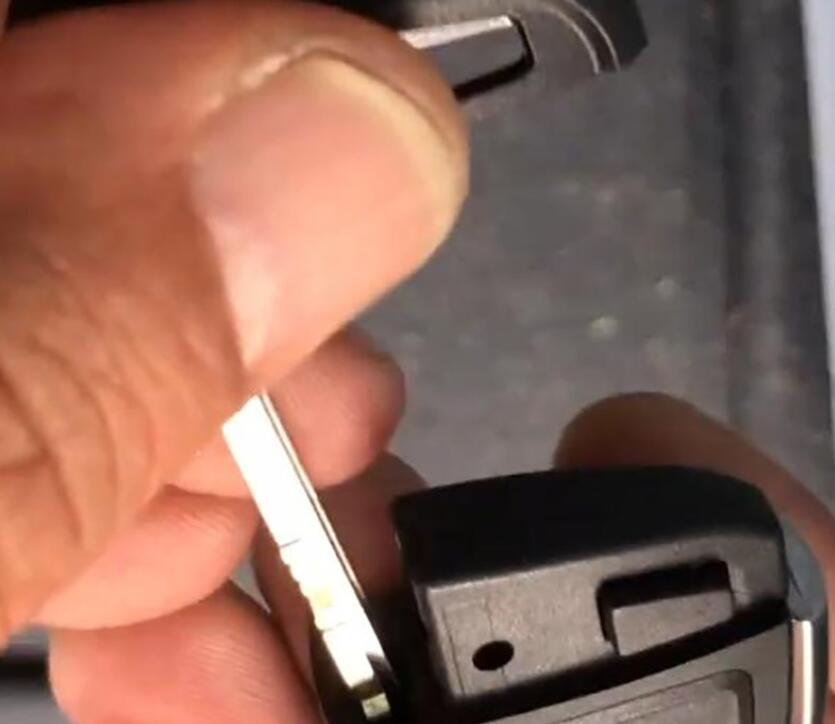
Install the proximity key into XSKF01EN key.

Hyundai-Santa-FE-2010-AKL-Programming-by-Autel-IM608-Success-10

Now we can start the car with the new key.

Complete!Nice work!
As you can see, very professional works and user-friendly guided procedure.

If you want to know more about Key Programmer , please visit our website: https://www.obd2tool.com

Wednesday, January 19, 2022

Mercedes All Keys Lost Programmed by Autel IM608 Scanner

This article is to guide customers through the whole process of All Keys Lost for a Mercedes with Autel IM608 Scanner. We need to do some necessary preparation before this All Keys Lost for a Mercedes Programming Test.

What tools are needed:
G-box, XP400 Pro, cable to connect XP400 Pro with EIS component, JVCI, JVCI cable
Make sure the network connection is good and follow the instructions for key learning with all keys lost.

Select the model type of “Mercedes Benz”, tap “Smart selection”>>All Keys Lost (Fast)>>On Bench (G-box Fast)

Mercedes-All-Keys-Lost-Programmed-by-Autel-IM608-Scanner-1
Mercedes-All-Keys-Lost-Programmed-by-Autel-IM608-Scanner-2
Mercedes-All-Keys-Lost-Programmed-by-Autel-IM608-Scanner-3

Since we are working on bench, we don’t need to read VIN.
We can check EIS number on the EIS and select it on screen. In this case, it is 209.
So tap “W209/2006-”, it will come to a Note like this:

Mercedes-All-Keys-Lost-Programmed-by-Autel-IM608-Scanner-4
Mercedes-All-Keys-Lost-Programmed-by-Autel-IM608-Scanner-5

Connect the power adapter to the G-box, follow the below diagram to connect the wires to EIS component.

Mercedes-All-Keys-Lost-Programmed-by-Autel-IM608-Scanner-6

You still have to connect the JVCI and JVCI cable to the G-box.
Ready to begin now!
Follow the instructions on the screen and enter a blank key into the XP400 Pro.

Mercedes-All-Keys-Lost-Programmed-by-Autel-IM608-Scanner-7

It will begin communicating the key. Please wait…

If there is no password for the key, tap “NO”. Then you will have to enter “Password Calculation process”.

Mercedes-All-Keys-Lost-Programmed-by-Autel-IM608-Scanner-8
Mercedes-All-Keys-Lost-Programmed-by-Autel-IM608-Scanner-9

Please strictly follow this:

Mercedes-All-Keys-Lost-Programmed-by-Autel-IM608-Scanner-10

This Password Calculation process will take about 5 minutes.

Success!

Mercedes-All-Keys-Lost-Programmed-by-Autel-IM608-Scanner-11

Once the Password Calculation process is completed, the key learning process will just take a few more seconds.

It is now at generating key file>>Write BE key file

Follow this step until it is done.

Mercedes-All-Keys-Lost-Programmed-by-Autel-IM608-Scanner-12

All keys lost completed!

Mercedes-All-Keys-Lost-Programmed-by-Autel-IM608-Scanner-13

The G-box makes the All Keys Lost process much simpler when working with a Mercedes.

A big success in all keys lost programming with Autel IM608 professional scanner.

Wednesday, October 27, 2021

How to Program Jaguar X-type 05 All Keys Lost

How-to: Jaguar X-type 2005 Tibbe FO21 All Keys Lost programming.

What tools:

FO21 Tibble lock decoder to open car

Cut key with Xhorse condor xc-mini plus key cutting machine

Generate remote with keydiy kd-x2

Generate transponder with VVDI Key Tool

Program key to car with Autel IM608/IM508

How-to:

How-to-Program-Jaguar-X-type-05-All-Keys-Lost-1
How-to-Program-Jaguar-X-type-05-All-Keys-Lost-2
How-to-Program-Jaguar-X-type-05-All-Keys-Lost-3

1.Open car with FO21 tibbe lock decoder
2. Decoding
Code: 2-4-3-4-1-2

How-to-Program-Jaguar-X-type-05-All-Keys-Lost-4

The rear ring moves the front PIN.
Note the direction when milling

3. cutting key with xhorse condor mini plus and M3 clamp

How-to-Program-Jaguar-X-type-05-All-Keys-Lost-5
How-to-Program-Jaguar-X-type-05-All-Keys-Lost-6
How-to-Program-Jaguar-X-type-05-All-Keys-Lost-7
How-to-Program-Jaguar-X-type-05-All-Keys-Lost-8

Select Cut by bitting- FO21- Jaguar
Inutbititng and cut key

How-to-Program-Jaguar-X-type-05-All-Keys-Lost-9
How-to-Program-Jaguar-X-type-05-All-Keys-Lost-10
How-to-Program-Jaguar-X-type-05-All-Keys-Lost-11
How-to-Program-Jaguar-X-type-05-All-Keys-Lost-12

customer wants 2 remote keys, 1 flip key and 1 non flip

How-to-Program-Jaguar-X-type-05-All-Keys-Lost-13

4. Generate remote with Keydiy KD-X2

How-to-Program-Jaguar-X-type-05-All-Keys-Lost-14
How-to-Program-Jaguar-X-type-05-All-Keys-Lost-15

generate without battery
Select Generate Remote- Jaguar- 433MHz- Generate

5.
Generate transponder with vvdi key tool or mini key tool
use super chip xt27 to generate 4D60

How-to-Program-Jaguar-X-type-05-All-Keys-Lost-16

put super chip into indiction coil
in vvdi key tool, select Transponder clone
It read ID46 chip and says it is cloneable
Select Generate transponder -4D -ID60

How-to-Program-Jaguar-X-type-05-All-Keys-Lost-17

Generate transponder success

install the non flip remote

How-to-Program-Jaguar-X-type-05-All-Keys-Lost-18

test frequency, it shows 434MHz

6. Last step we need to match keys to the immobilizer with autel im608 or im508
insert key and turn on ignition switch
Select Immo- Jaguar – Automatic selection
VIN is read

How-to-Program-Jaguar-X-type-05-All-Keys-Lost-19

confirm vehicle information
Immo status scan

How-to-Program-Jaguar-X-type-05-All-Keys-Lost-20
How-to-Program-Jaguar-X-type-05-All-Keys-Lost-21
How-to-Program-Jaguar-X-type-05-All-Keys-Lost-22

Follow IM608 prompts to program key2 and key 3 until finished.

Test new keys.