Wednesday, January 10, 2018

How to use SKP1000 to program key on specific car model

SKP-1000 Tablet Auto Key Programmer a rebadged CI600 Plus (Chinese version) ,with one key upgrade,supports free update online for one year,small and easy to carry.mainly programs kinds of key  on a wide range of car brands from all of the world,as well as performs pin code calculation, mileage adjustment,  EPB+ Oil serrvice Reset and many other special functions etc.

SKP 1000 will be the perfect replacement for Superobd SKP-900 (which will stop producing).


How to use SKP1000 to program key on specific car model?

Step-by-step procedure: 

For example, to operate Hyundai SONATA 8 smart remote controller, firstly connect the main cable to the machine, then plug the OBDII adapter to the car.

Power on the SKP1000 machine, until you see the LOGO, press [YES] to main menu, Choose “Immobilizer”, press “Confirm” to vehicle list.


Choose model: Hyundai, press “Confirm” to enter.


Choose “Smart card”, press “Yes” to enter.


Choose ” by car model”, press “Yes” to enter.


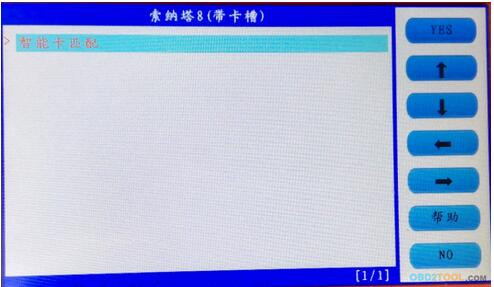
Choose “SONATA 8 (with card slot), press “Yes” to enter.


Choose “Smart card (with card slot), press “Yes” to enter.

;

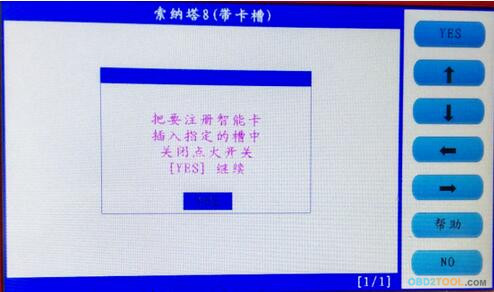
Follow the tip to turn off ignition, press “Yes”

Follow the tip to open the door and close for one time, press “Yes”.

Choose smart card to match, press “Yes”

Follow the tip, insert the smart card into the slot, and you can hear alarm sound, turn off the ignition, press “Yes”.

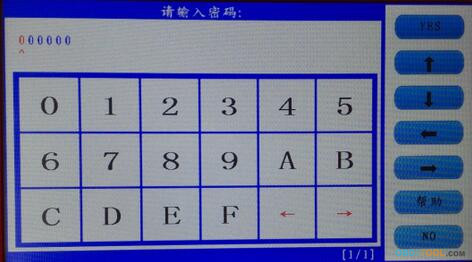
Input the password

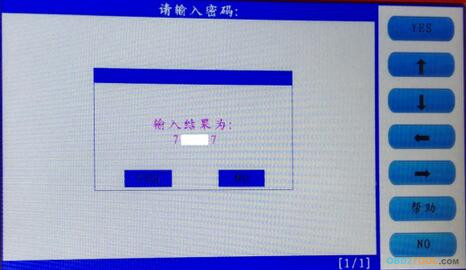
Check if the password is correct, press “Yes” to confirm.

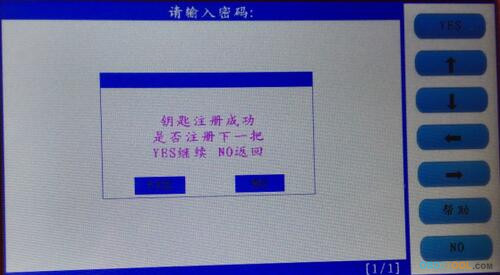
The first smart card program successfully, and it will ask you if you program the next one, press “Yes” to confirm.

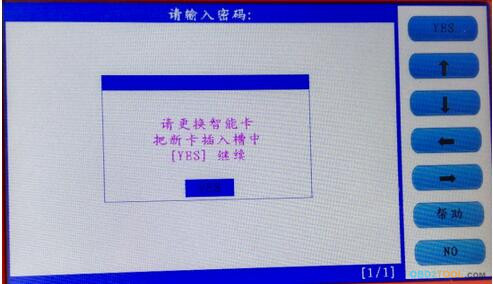
Insert the second smart card into the slot, you can hear the alarm sound, press “Yes”.

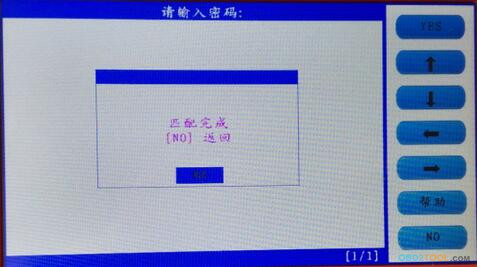
Program successfully, press “No” to back.

With two new smart card keys, you could start the car, if you need key programming machine to add more keys, just repeat the above steps.

How to Update Firmware of SKP1000 Tablet Key Programmer

As superobd SKP-900 will stop producing,our SKP-1000 will perfectly replace it from now on.

SKP1000 tablet auto key programmer, a rebadged Lonsdor CI600 Plus (Chinese version), mainly programs kinds of key on a wide range of car brands from all of the world,as well as performs pin code calculation, mileage adjustment, EPB+ Oil serrvice Reset and many other special functions etc


SKP1000 Key Programmer Supported Vehicle List:

BAIC, BENZ, BESTURN, BMW, BRILLIANE, BYD, CHANGAN, CHANGHE, CHERY, CHRYSLER(CHRYSLER/DODGE/JEEP), DFFENGSHEN, DFPV, FAW, FIAT,
FORD/LINCOLN, GEELY/HUAPU/SQYL,GM(BUICK/CADILLAC/CHEVROLE/GMC/HUMMER), GREATWALL, HAFEI, HAWTAI, HIMIKO, HNMAZDA, HONDA/ACURA, HONGQI, HYUNDAI, ISUZU, JAC, JAGUAR, KIA, LANDROVER, LIEBAO, LIFAN, LUFENG, LUXGEN,
MASERATI, MAZDA, MITSUBISHI, NISSAN/INFINITI, OPEL, PEUGEOt/CITROEN, PORSCHE, PROTON, QQROS, RENAULT, ROEWE/MG, SGMW, SMART, SSANGYONG, SUBARU, SUZUKI, TJFAW, TOYOTA/LEXUS, VW/AUDI/SKODA/SEAT, YOUNGLOTUS, ZZMAZDA, ZZNISSAN, ZOTYE;

our skp100 supports one key upgrade and free update online for one year

now we will guide you how to update its firmware as below

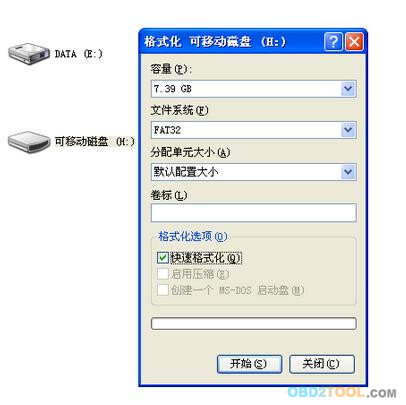
Before update firmware, please take out the TF card and insert it into the card reader, then plug into the computer USB port. Double click “My Computer”, find out ” local Disk (H:), right click to choose “Format”.


Tip: Tick on the “Quick format” and click “Start.

After complete format, go to the official site to download the update file, then copy and paste the file into the TF card, after finish, plug the TF card into the machine, power on the machine to the main interface.


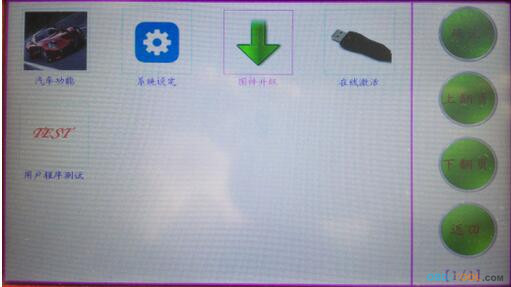
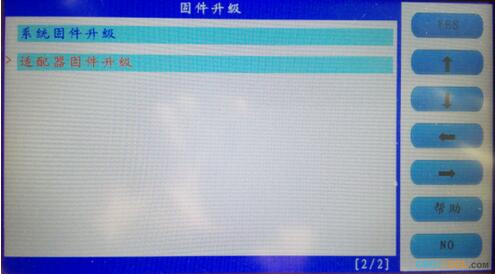
Click on “Firmware update”.


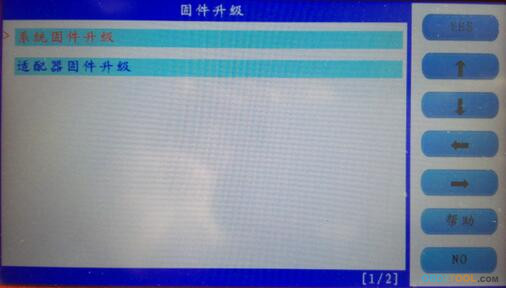
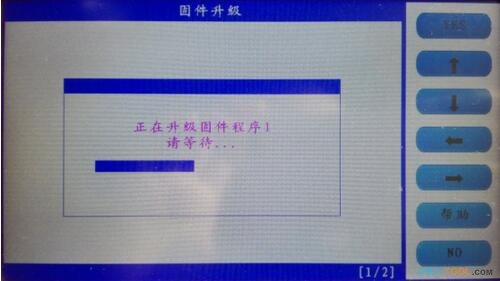
Firstly choose “System firmware update”, press “Yes”, the procedure shown as below:


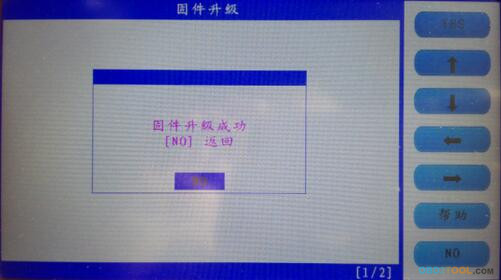
Update successfully shown as below.


Press “No” to back.


Choose ” Adapter firmware update”, after finish, reboot the machine to go on use SKP1000.

Done.

the firmware update is very easy,if any question or problem,please feel free to contact us,besides,our skp1000 has below special functions

SKP1000 Key Programmer is with special feature: 

“One Key Upgrade” button allows SKP1000 to free update online for one year.
SKP1000 Key Programmer Features:
Red color
Handheld with 4″ display screen
Not too heavy to hold, very easy to take
SKP1000 Car Key Programmer Functions List:
Clear key memory;
Program keys, proximity keys, smart key, flip keys;
Program after-market and OEM keys;
Read keys from immobilizer memory
New mechanical key number programming;
Vehicle identification key programming;
Reset ECU& Reset immobilizer;
New remote controller programming;
Immo PINCODE reader for many vehicles and no need pincode when programming keys for many vehicles
Mileage adjustment via OBD;
With full and strong database for the most important vehicle makes;
Remote assistance
EEPROM chip read and immobilizer initialization;
EPB(Electric park brake);
Oil/Service reset;
EEPROM/PIC adapter

it is a good tool and worth to buy!

SKP1000 Tablet Auto Key Programmer A Must Tool

SKP1000 Tablet Auto Key Programmer A Must Tool for All Locksmiths Perfectly Replaces SKP900 Key Programmer

Top 7 reasons to get SKP1000 Tablet:
1. Powerful Auto Key Programming with multifunctions like mileage correction,remote controller, Oil/service Reset, throttle body adjustment, EPB, pin code calculation and special function,Perfectly Replace CI600 Plus and SKP-900
2.Lifetime free update: One Key Upgrade,Support Firmware update. Latest software version: V18.9
3.Manufacturer: Lonsdor (Same manufacturer as Lonsdor K518 and CI600 Plus)
4.Suppoted Language:English only, more language is waiting to release.
5.Supported Protocols: SAE-J1850 PWM, SAE-J1850 VPW, KWP2000, ISO-9141, CANBUS, SINGLE CAN
6.SKP1000 Programmer vehicle coverage: Support almost all cars in the world, such as Audi, Volkswagen, Ford, Land Rover, Chrysler, Jeep, Toyota, Nissan, Honda, Mitsubishi, Hyundai, Kia, and so on.SKP1000 also can do Mileage Adjustment, Support Ford and Nissan pin code calculate.
7.No need tokens.
How to update V18.9 SKP1000 Tablet Key Programmer: V18.9 Software Free Download
1. Format SD card
2. Unzip the SKP1000 V8.19 update file to the SD card root directory.
click to link to download skp1000 v8.19 update file
3. Turn off the SKP1000 machine, then insert the SD card, then turn on machine.
4. Go to ” UPDATE FIRMWARE”, tap ” SYSTEM FIRMWARE” to wait it update completely ( it will take 1 minute, during the wait time, do not disconnect the power adapter, if the power is off, turn off the machine and try one more time)
5. Update upgrade complete, turn off the machine.
6. Turn on machine, update successfully.

SKP1000 programmer will be the perfect replacement for Superobd SKP900 (which will stop producing). SKP1000 Key Programmer is with special feature: “One Key Upgrade” button allows SKP1000 to free update online


SKP1000 Key Programmer Features:

Red color
Handheld with 4″ display screen
Not too heavy to hold, very easy to take

SKP1000 Car Key Programmer Functions List:

Clear key memory;
Program keys, proximity keys, smart key, flip keys;
Program after-market and OEM keys;
Read keys from immobilizer memory
New mechanical key number programming;
Vehicle identification key programming;
Reset ECU& Reset immobilizer;
New remote controller programming;
Immo PINCODE reader for many vehicles and no need pincode when programming keys for many vehicles
Mileage adjustment via OBD;
With full and strong database for the most important vehicle makes;
Remote assistance
EEPROM chip read and immobilizer initialization;
EPB(Electric park brake);
Oil/Service reset;
EEPROM/PIC adapter

SKP1000 Programmer Supported Protocol:

SAE J1850 PWM, SAE J1850 VPW, KWP2000, ISO 9141, CANBUS, SOME MAY

SKP1000 Key Programmer Supported Vehicle List:

BAIC, BENZ, BESTURN, BMW, BRILLIANE, BYD, CHANGAN, CHANGHE, CHERY, CHRYSLER(CHRYSLER/DODGE/JEEP), DFFENGSHEN, DFPV, FAW, FIAT,FORD/LINCOLN, GEELY/HUAPU/SQYL,GM(BUICK/CADILLAC/CHEVROLE/GMC/HUMMER), GREATWALL, HAFEI, HAWTAI, HIMIKO, HNMAZDA, HONDA/ACURA, HONGQI, HYUNDAI, ISUZU, JAC, JAGUAR, KIA, LANDROVER, LIEBAO, LIFAN, LUFENG, LUXGEN,
MASERATI, MAZDA,MITSUBISHI, NISSAN/INFINITI, OPEL, PEUGEOt/CITROEN, PORSCHE, PROTON, QQROS, RENAULT, ROEWE/MG, SGMW, SMART, SSANGYONG, SUBARU, SUZUKI, TJFAW, TOYOTA/LEXUS,VW/AUDI/SKODA/SEAT, YOUNGLOTUS, ZZMAZDA, ZZNISSAN, ZOTYE;


Below show the detail of functions
Choose “Immobilizer”, then the car brand shown as below.


Mileage adjustment via OBD
Choose “Adjust mileage”, then the car brand shown as below.


New remote system programming
Choose “Remote system”, then the car brand shown as below.


Oil/Service reset
Choose “Maintenance”, then the car brand shown as below.


Throttle body adjustment
Choose “ETC”, then the car brand shown as below.


EPB(Electric park brake)
Choose “EPB”, then the car brand shown as below.
Woks on Changhe, Ford, Suzuki, Mazda, Chery, Kia, Nissan and Hyundai.


Immo PINCODE reading
Immo PINCODE reader for many vehicles and no need pin code when programming keys for many vehicles.


honda key programmer SKP1000 Programmer PCB Display:


SKP1000 Key Programmer Packing List:

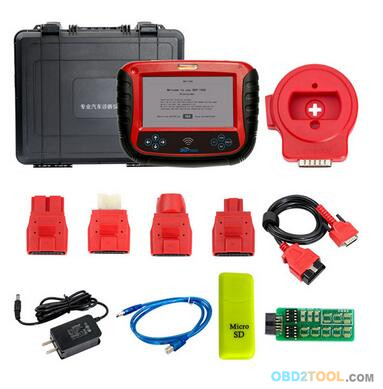
1pc x SKP1000 main unit
1pc x touch pen
1pc x main cable
1pc x for Honda 3pin adapter
1pc x for Kia 20pin adapter
1pc x for Hyundai / Kia 10pin adapter
1pc x for Haima 7pin adapter
1pc x power adapter
1pc x tf card
1pc x TF card reader
1pc x usb cable
1pc x CD with manual

SKP1000 Key Programmer on OBD2TOOL Packing List

SuperOBD SKP-900 tested yes or no (reviews)

In view of many customer inquiries about SuperOBD SKP900 recently, we here collected some reviews on SKP900 yes or no.

SKP900 Key Programmer Supported Car Makes:


SKP900 key programmer YES (Tested OK)

Honda:

2013 Acura

2008 Honda civic

2015 Honda civic smart key all lost

2014 Honda CR-V smart key all lost

2015 Honda Accord all key lost

2015 Honda Odyssey smart key all lost

Ford:
Ford PATS6

2013 Ford Ranger

2013 Ford Mustang

2013 Ford Edge all keys lost works fine

2011-2013 Ford F-150

2008 Focus petrol UK model

VW:

2002 Volkswagen GTI

2000 VW Transporter read pin code program key

2007 VW Transporter read pin code program key

Dodge:

2004 Dodge Caravan lost key works

2009 Dodge charger add Fobik key ok

2008 Dodge Charger works fine

Toyota:

2009, 2012-2013 Toyota Camry Remote + Transponder

2013 Toyota Highlander Remote + Transponder

2009 Toyota Land Cruiser add key

KIA& Hyundai:

2014 KIA Rio all keys lost

2013 KIA Soul all keys lost

2013 KIA Forte all keys lost

2011 Hyundai ix35 remote

Land Rover:

Land Rover Discovery 3 add key

Range Rover 2010 add key

Jaguar:

2005 Jaguar X-type lost keys

2006 Jaguar XJ lost key

Jeep:

2012 Jeep Compass all keys lost

2008 Jeep Wrangler all keys lost

Others:

2015 Maserati Ghibli read pin code program Key

2005 Audi A4 remote

2007 Mazda 3 lost keys

2006 Peugeot 407 add key

2013 Chrysler 200 all keys lost

2012 Nissan Altima smart key all lost works

SKP900 key programmer NO (Tested not OK)

2002, 2004, 2014 Ford Fiesta

2004 Ford Mondeo

2007 Ford Transit

2013 – Ford Kuga

2011 – Ford Focus

2001 Honda Civic

2009 Suzuki Swift

2007 KIA Picanto

2014 Toyota Prado

2014 Toyota Fortuner

Mazda 3 Axela

Land Rover Freelander 2

Land Rover Discovery 4

How to Change SKP1000 Language to English in Special Function Like Remote Keys

SKP1000 tablet auto key programmer, mainly programs kinds of key on a wide range of car brands from all of the world just like our SKP900,while SKP1000 can also performs pin code calculation, mileage adjustment, EPB+ Oil serrvice Reset and many other special functions etc.

our skp1000 language is English,but some customers may got below error in Chinese


what’s more,you can not find the choice in Setting to change the language to English


why it occured while other key programming function are all in English except remote key programming

infact for toehr special functions like mileage adjustment, EPB+ Oil serrvice Reset etc are also in Chinese too

Please don’t worry, key programming machine skp1000 factory did not translate special function language into English before selling,this is a mistake but can be solved easily as below

1.please find the serial number in adapter system information,click the red circle selection


you will get the SN


send us the SN,factory will make a” AdapterFile.bin” for you the next day,please copy this file to your skp1000 sd card in file “dl_file”


then open skp1000,find icon “update firmware”


Select “ADAPTOR FIRMWARE”


click and wait for update,this will take 20-30 minutes,after update finished,the language will change to English automatically

How to Solve The Connection Problem of SKP-900


Some customers said there is no reaction when their SKP-900 is connected to computer, and Carkeydeal will give you the solution.

Q: I want to add tokens for SKP900, but when I connect it to the computer, it can’t be recognized. How to solve it?
A: First, pls use windows XP system.
If it can’t work, then change another USB to try.
If it still doesn’t work, pls pull and insert the USB cable to check whether the device manager has reaction or not.
If above methods don’t work, please open main unit of your Auto Key Programming SKP900, check this chip, maybe this chip pins are loose, then solder the chip.


This is from OBD2TOOL: Best car key tools for sale website Universal Key Programmer technical support: How to Solve The Connection Problem of SKP-900

Thursday, December 21, 2017

How to Program Porsche Cayenne 11-15 Smart Key With Lonsdor K518ISE

Here’s the instruction on programming smart key card to Porsche Cayenne from year 2011 to year 2015 by using Lonsdor K518ISEcar key programmer (Lonsdor K518 English version).
Function
  1. Program smart key: to program smart card (please make dealer key first);
  2. Make dealer key: use the backed up BIN data to make the non-dedicated key to be dealer key.
Reference
Chip type: Dedicated smart card
Frequency: 315/433/434 frequency (please check the logo in the lower right of the lid of the BCM box)
Key embryo no.: 31
Code requirement: Dismantle & read BCM to make dealer key
Key generation: Program smart key complete, remote will automatically generated
Under the steering wheel (BCM position):
lonsdor-k518ise-Porsche-Cayenne-1
BCM is located at the bottom left of the steering wheel, please note the frequency type, basically there will be 315/433/434,
The following picture is for 434 frequency:
lonsdor-k518ise-Porsche-Cayenne-2
2011-2015 Cayenne Car Model
lonsdor-k518ise-Porsche-Cayenne-3
The car key
lonsdor-k518ise-Porsche-Cayenne-4
The induction keyhole
lonsdor-k518ise-Porsche-Cayenne-5
The mechanical knob key inserted into the induction keyhole
lonsdor-k518ise-Porsche-Cayenne-6
Attention
  1. All the keys need to learn, or it will not be able to start the vehicle, it is recommended to learn the original car keys first,and then learn the new key, battery must be well installed.
  2. The newly added key must be either the dealer key made via the car BCM data, or the key ordered back through the VIN code.
  3. When learning key, it is required to insert the key into the induction keyhole, to learn a smart key, remove the machanical rotate key from the induction keyhole if any and then insert the smart key to program.
Operation
Step 1: Use the programmer to read and write BCM data and save it as bin file;
  1. BCM is located in the lower left of the steering wheel, please pay attention to view the frequency type, usually there will be 315,433,434 frequency (below picture is for 434):
lonsdor-k518ise-Porsche-Cayenne-7
  1. Read the BIN (D-FLASH / EEPROM) file with the VVDI PROG programmer specifically for reading BCM. Please pay attention to the type here: namely 1L15Y 2M25J metal crystal, or 5M48H 1N35H ceramic crystal (red mark):lonsdor-k518ise-Porsche-Cayenne-8
  2. Please refer to the following picture to wire:    lonsdor-k518ise-Porsche-Cayenne-9
lonsdor-k518ise-Porsche-Cayenne-10
Step 2: Copy the bin file into Lonsdor K518ISE car key programmer:please use the USB cable to connect the K518ISE to the computer, open the device internal memory, find the folder “customfile” and copy the bin file into it (as shows below).
Note: bin file suffix “bin” must be lower case letters, directly put the file into the folder rather than create a new folder:
lonsdor-k518ise-Porsche-Cayenne-11
Step 3: Make dealer key
Step 4: Program smart key