Thursday, December 7, 2017

CGDI Prog BMW Key Programmer

CGDI Prog BMW MSV80 is an excellent programmer designed for auto diagnostics, programming and security maintenance. Here, i will make clear how to use the CGDI Prog BMW key programmer device.
19-1
Key Programming for BMW CAS1/CAS2/CAS3
Key Matching & All key lost for CAS4 /CAS 4+
Connection: through OBD
Features:
Runs fast with safety
Programs keys for a short time
Module list:
1.BMW CAS1/CAS2/CAS3/CAS3+/key increasing matching,KEY all lost matching,CAS computer replace,CAS3+/P4X above version can directly downgrade by OBD in 5 minus 100% safety.
2.BMW CAS4/CAS4+/Support key matching,support key all lost matching.
3.BMW key inspection,can check key what status in.
4.BMW engine computer DME replacement.
CGDI Prog On Obd2tool.com Car list:
19-2
BMW key programmer for sale:
AK90 key programmer:
read all EWS key information from EWS2.1/EWS2.2/EWS3/EWS3.3/EWS4/EWS4.4 system from 1995-2009
AK300+ BMW CAS Key Maker :
only work for BMW from 2002 -2009 years with new BMW CAS,CAS2,CAS3,CAS3+.
YanHua CKM100 key programmer:
Old BMW (EWS2.EWS3.EWS4)
BMW 1/3/5/6/X (E87.E90.E91.E92.E60.E61.E63.E70.E71) series black shell
CAS 2
BMW 1/3/5/6/X (E87.E90.E91.E92.E60.E61.E63.E64.E70.E71) series black shell CAS 3/3+
BMW 7 series E65, E66, CAS
BMW Multi Tool:
work for BMW CAS 1 CAS2 CAS3 CAS3+ CAS4key programmingby OBD2
VVDI2 BMW:
Read/Write EWS, Read CAS information, Read/Write CAS EEPROM,
Read/Write KM stored in CAS, synchronization DME with CAS, synchronization CAS with
ELV, Key Learn(immo), File Make Key, Unlock Key, File Change KM, CAS Repair etc
OBD Flash ISTA version only need 10 minutes. (No extra power. No backup CAS
EEPROM and FLASH)
OBD Function
Support CANBUS100, CANBUS500 and KWP protocol.
Diagnostic CAS information
Key Learn
1) Get Key Info
2) Write Key Info
3) Prepare dealer key with programmer (Support CAS1, CAS2, CAS3,
CAS3+, ISTAP)
4) Prepare dealer key with ignition switch (Support CAS1, CAS2, CAS3,
CAS3+, ISTAP)
5) Program Key info
6) Enable/Disable Key (Support CAS1, CAS3, CAS3, CAS3+, CAS4,
CAS4+)
7) Clear DTC/Shadow
Read/Write CAS EEPROM
Change KM stored in CAS
Read/Write synchronization codes stored in CAS
Synch DME – CAS
Synch CAS – ELV
Read/Write EWS EEPROM
? File Make Key
Support following types:
EWS1
EWS2
EWS3EWS4
CAS1(0K50E)
CAS2(2K79X)
CAS3(0L01Y)
CAS3+(0L15Y/0M23S): Support encrypt version and ISTAP version
CAS4 (F – Series 1L15Y)
CAS4 (F – Series 5M48H): Support CAS4 encrypt version
? File Change KM
Support following types:
EWS3
EWS4
CAS1(0K50E)
CAS2(2K79X)
CAS3(0L01Y)
CAS3+(0L15Y/0M23S)
CAS4 (1L15Y)
CAS4 (5M48H)
M35080(E – Series cluster)
F – Series cluster
? Unlock key
Support unlock key for CAS1/CAS2/CAS3/CAS3+ prepared by VVDI2
? CAS Repair
CAS1 Repair (OBDII)
ISTAP Repair (OBDII)

CGDI BMW FEM BDC key learn in the dismantling method

CGDI BMW FEM BDC key learn is in the dismantling method instead of OBD method. Then you have to know
the FEM/BDC system location, 95128 IC location, 95256 IC location and Key learning position, read the
detail in the below parts.
1.BMW FEM/ BDC installation location.
18-01
2.95128 IC location
18-02
3.95256 IC location
18-03
4.Key learning position
18-04
That’s all.

CGDI PROG BMW program F31 smart key FEM

TOPICS:CGDI Prog BMW
17-2
CGDI Prog MSV80 can program keys to BMW CAS1, CAS2, CAS3, CAS3+, FEM, BDC. Here, i will display how to use CGDI PROG BMW for F31 FEM remote programming.
Remote: 868
Chassis: F020
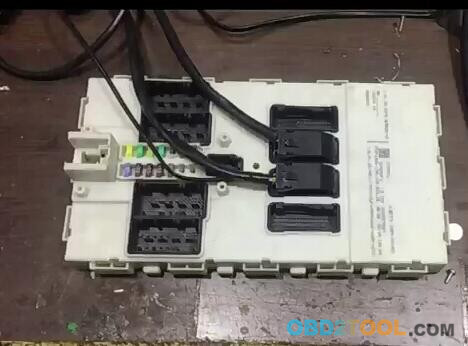
BMW F31 FEM
CDDI PROG can program keys to BMW CAS1, CAS2, CAS3, CAS3+, FEM, BDC. Here, i will display how to use CGDI PROG BMW for F31 FEM remote programming. Remote: 868 Chassis: F020 BMW F31 FEM 1 Voltage test platform 2 CGDI PROG BMW (this tool supports key matching and new key programming (when all keys are lost) of BMW CAS1, CAS2, CAS3, CAS3+, FEM, BDC) 3 The procedure: Run CGDI PROG BMW software on www.obd2tool.com after finish all connection Go to FEM/BDC key match 4 The current FEM BDC needs update the ECU program before performing key matching. Please ensure that the car battery has enough power. The programming process, please keep the equipment cable connection 6 Please remove the FEM BDC and then use the programmer to read and save data from the 95XXX EEPROM chip on FEM BDC computer board 7 Read the original car EEPROM data file 8 The 95128 EEPROM chip 9-11 CGDI BMW is reading the chip data 12-15 Save data 16 Use the programmer to write the calculated new data to the 95XXX EEPROM chip , then put the FEM BDC back into the car 17.18 Write M95128 19 Check the FEM connection 20 Voltage test platform is on 21 Use the programmer to write the calculated new data to the 95XXX EEPROM chip , then put the FEM BDC back into the car 22 The ECU is being programmed... 23-25 Again, write M95128 26 Again, write M95128 27 Voltage test platform should be on 28 The FEM 29 Please remove the FEM BDC and then use the CGDI programmer to write the original car EEPROM data back to 95XXX EEPROM chip and FEM BDC back into the car 30 Coding is successful!!!! 32 33 Job’s done.
Voltage test platform
17-1
CGDI PROG BMW
(this tool supports key matching and new key programming (when all keys are lost) of BMW CAS1, CAS2, CAS3, CAS3+, FEM, BDC)
17-3
The procedure:
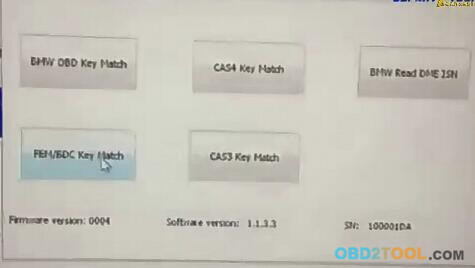
Run CGDI PROG BMW software after finish all connection
Go to FEM/BDC key match
17-4
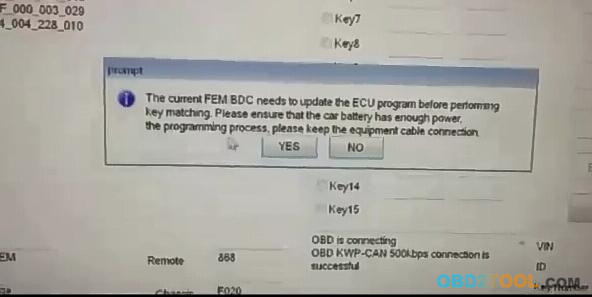
The current FEM BDC needs update the ECU program before performing key matching. Please ensure that the car battery has enough power. The programming process, please keep the equipment cable connection
17-5
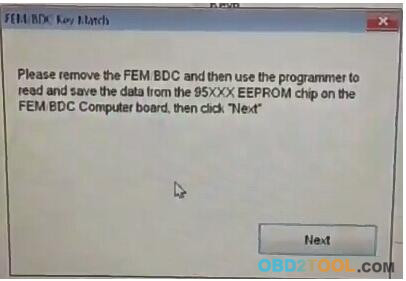
Please remove the FEM BDC and then use the programmer to read and save data from the 95XXX EEPROM chip on FEM BDC computer board
17-6
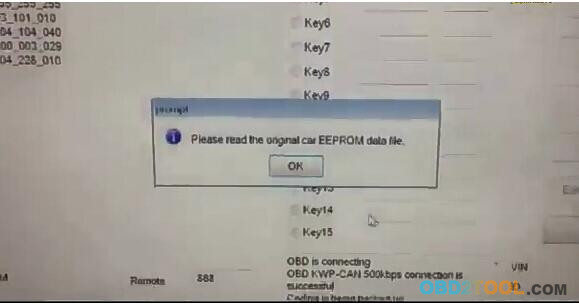
Read the original car EEPROM data file
17-7 17-8
The 95128 EEPROM chip
17-9 17-10 17-11
CGDI BMW is reading the chip data
17-12 17-13 17-14
17-15
Save data
17-16
Use the programmer to write the calculated new data to the 95XXX EEPROM chip , then put the FEM BDC back into the car
17-17 17-18
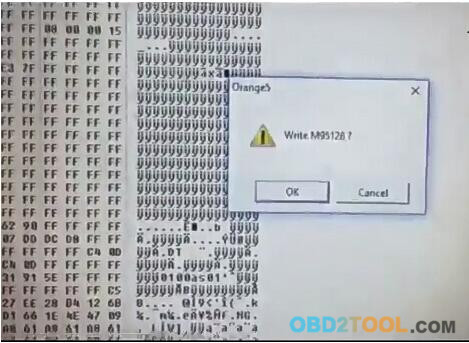
Write M95128
17-19
Check the FEM connection
17-20
Voltage test platform is on
17-21
Use the Key Program Tool to write the calculated new data to the 95XXX EEPROM chip , then put the FEM BDC back into the car
17-22
The ECU is being programmed…
17-23 17-24 17-25
Again, write M95128
17-26
Again, write M95128
17-27
Voltage test platform should be on
17-28
The FEM
17-29
Please remove the FEM BDC and then use the CGDI programmer to write the original car EEPROM data back to 95XXX EEPROM chip and FEM BDC back into the car
17-30
Coding is successful!!!!
17-31 17-32
Job’s done.

CGDI Prog Key Programmer read BMW CAS3 ISN by OBD

Here is the easy steps to read BMW CAS3 ISN by using CGDI Prog BMW MSV80 key programmer via OBD.
16-1
Connect CGDI Prog key programmer with laptop and vehicle from obd2tool.com
16-2
Open key programming tool CGDI Prog software on desktop
Select BMW Read DME ISN function
16-3
16-4
Click on Read CAS ISN
16-5
Reading data
Please remove the key from the ignition
16-6
The CAS ISN data was read successfully.
Related article:
How to use CGDI Prog to Program BMW CAS3 key by OBD

How to Program BMW F30 FEM Key with CGDI Prog Key Programmer

Here’s the little guide on programming key on a BMW F30 FEM system with CGDI Prog BMW MSV80 Car Key Programmer.
Device required:
CGDI Prog BMW key programmer on OBD2TOOL
BMW FEM/BDC Test Platform for BMW  F20 F30 F35 X5 X6 I3
Preparation:
Disassemble the FEM/BDC module from vehicle
Procedure:
Connect BMW FEM/BDC test platform with CGDI Prog  and FEM/BDC module
15-1
15-2 15-3
Open CGDI Prog BMW software
15-4
Select FEM/BDC Key Match
15-5
The current FEM BDC needs to update the ECU program before performing key matching. Please ensure that the car battery has enough power supply. Please do not disconnect cable connection during programming procedure.
15-6
Please remove the FEM BDC and then use the programmer to read and save the data from the
95xxx EEPROM chip on the FEM/BDC computer board, then click “Next”
15-7
Please read the original car EEPROM data
15-8 15-9 15-10 15-11
Read eeprom data with programmer, i.e Orange 5 eeprom programmer
and save data
15-12 15-13
User the programmer to write the calculated new data to the 95xxx eeprom chip, then put the FEM BDC back to the car
click Next
15-14
Click OK to write M95128
User the car key programmer to write the calcutaed new data to the 95xxx eeprom chip, then put the FEM BDC back to the car
click Next
Power on BMW FEM BDC test platform
The yellow indicator will flash
15-15 15-16
Coding is being backed up
The ECU is being programmed
and verify flashing
15-17 15-18
Program BMW F30 FEM key success
15-19